


Back to category

 View product specifications
 Secure payment

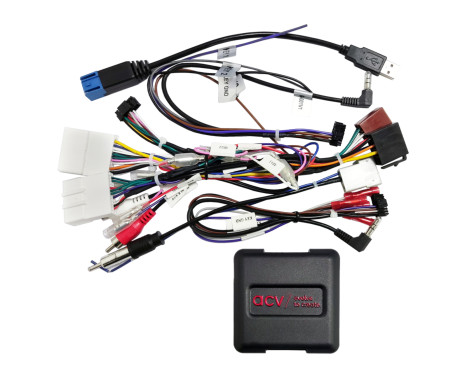
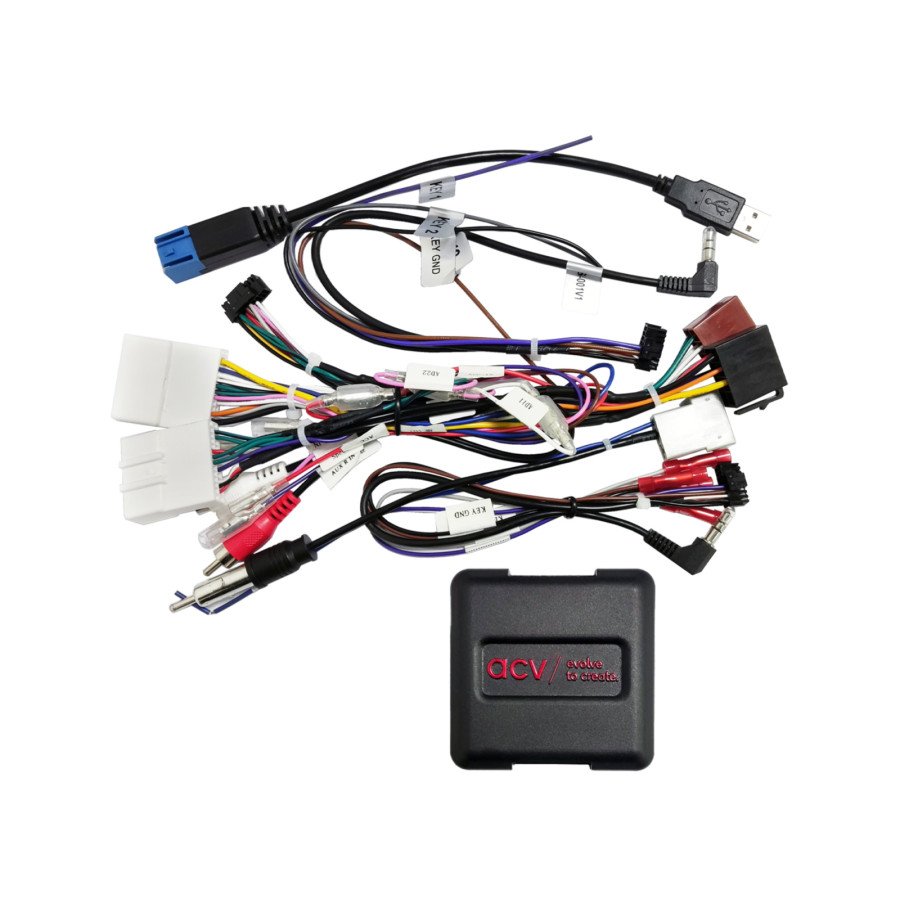
SWI Nissan 20Pin/ 24Pin Multilead USB/ AUX
Product number: 2023299
Manufacturer number: 42xns011
EAN: 4026724480580
£ 83.83
Incl. VAT
In stock
Delivery 30-07-2026
Free Shipping
Secure payment
-
 Free 30 days exchanges
-
Any part, any car
-
Fast shipping: 2 days
-
Expert support


Customer service: +31 85 070 52 25
Ask your question at our product specialists.
Questions and answers.
Fit guarantee, show parts suitable for your vehicle.
or .
-
Specifications
Nissan Steering Wheel Remote Control Adapter
Retain the original functions of your steering wheel remote control when replacing the factory radio with a retrofit radio.
Depending on the vehicle's equipment and the range of functions and software of the retrofit device, individual control functions may be omitted or replaced by other functions.
Compare the adapter plugs shown with those in your vehicle and ensure they match visually and technically.
Also check to see if one of the specified original factory radios was installed in your vehicle.
Before final installation, check that the vehicle functions, vehicle settings and steering wheel remote control are working properly.
Remark:
CAN bus
Connection: 20 pin / 24 pin Nissan connector
Connection: OEM steering wheel remote control > 3.5mm jack / loose cable
Connection: OEM antenna > DIN(m)
Connection: OEM AUX > Cinch(m) red/white
Connection: OEM USB > USB-A
blue: +12V antenna remote control
Vehicles without 360° OEM camera system
OEM AUX:
Check for correct assignment by measuring with OEM device before installation
Supported date/time settings
DIP switch settings for the retrofit device manufacturer (see BDA)
Suitable for the following vehicles:
Nissan Micra (K14) 03/2017 - 08/2019*
Nissan Pulsar (C13) 10/2014 - 06/2018
Nissan Qashqai (J11) 03/2014 - 07/2017**
Nissan Titan (H61) 2015 – 2019
The following signals are provided:
Re-imported vehicles or vehicles with different software may be incompatible in functions.
red: +12V ignition terminal 15
orange: +12V lighting terminal 58
purple/white: +12V reversing signal
pink: speed signal
green: ground GND handbrake signal
Output load capacity: 250 mA max.
Current requirement greater than 250 mA:
1 relay Coil resistance 75 Ohm min.
2 relays Coil resistance 150 Ohm min.
Steering wheel remote control
Supported date/time settings
*Vehicles without OEM PDC / OEM reversing camera
**Vehicles with Acenta equipment
General installation instructions:
Check:
1: Check all operating functions and vehicle setting features of the OEM device.
2: De-energize and remove the OEM device.
3: Turn off the power and check all interface connections for correctness and continuity.
Connection and connection sequence:
1: Disable the interface settings and hardware configuration.
2: Check the configuration of the radio connection cable.
3: Connect the radio connection cable according to the instructions for the device to be connected later.
4: Connect all other connections according to the manual of the expansion device.
5: Connect the entire installation to the vehicle using the live connection cable.
6: Software configuration of the interface according to the instructions in the article text and in the BDA.
7: Configure the retrofit device according to the operating instructions for the retrofit device steering wheel remote control/camera/FSE/antenna phantom power and others
8: Steering wheel remote control and vehicle function test
Changes to the hardware configuration of the interface and the radio connection cable:
1: Disable changes
2: Connection after change see above 5 to 8
If the interface or vehicle is not working properly:
1: Reset to the OEM device
2: Operate OEM device
3: Restore CAN bus status
4: Check the hardware configuration of the interface
5: Connection after CAN bus rest see above 5 to 8
Connections, connection modifications, alternative connections, connections of loose cables or connection extensions of loose cables mentioned in the information text or in the operating instructions are only intended as guidance and information for trained specialist personnel.
Additional connections, changes to the wiring harness cable configuration, or the use of alternative connections or connection extensions:
1: Connections and modifications may only be carried out by trained personnel
2: Connections and modifications must be checked for any manufacturer's approvals or manufacturer's warranty provisions that may be affected by the modifications before connection.
3: Connections and modifications must be checked for function and correctness by measuring and calibrating using the vehicle's wiring diagram before connection.
4: Connections and modifications are carried out under your own responsibility and without any guarantee of operation.
5: Connections and modifications are carried out at your own risk, without any guarantee for damage to the vehicle, the retrofit device or the interface.
6: Modifications to the pre-assembled wiring harness may void the product warranty.
Suitable for:
Nissan Qashqai 2014-2017
Nissan X-Trail 2014-2017
Nissan Pulsar 2014-2018
Nissan Micra 2017-2019
Nissan Titan 2015-2019
Warranty 2 years -
Applicability
NISSAN MICRA IV MICRA IV (K13K, K13KK) | 05.2010-10.2020 1.2 - 1198ccm, 76pk, 56kw - HR12DE MICRA IV (K13K, K13KK) | 05.2010-10.2020 1.2 - 1198ccm, 80pk, 59kw - HR12DE MICRA IV (K13K, K13KK) | 05.2010-10.2020 1.2 DIG-S - 1198ccm, 98pk, 72kw - HR12DDR, HR12DR MICRA V MICRA V (K14) | 12.2016-??? 0.9 IG-T - 898ccm, 90pk, 66kw - H4B 408, HR09DET MICRA V (K14) | 12.2016-??? 0.9 LPG - 898ccm, 87pk, 64kw - HR09DET MICRA V (K14) | 12.2016-??? 1.0 - 998ccm, 71pk, 52kw - B4D 410, BR10DE MICRA V (K14) | 12.2016-??? 1.0 - 998ccm, 73pk, 54kw - B4D 410, BR10DE MICRA V (K14) | 12.2016-??? 1.0 DIG-T 117 - 999ccm, 117pk, 86kw - HR10DDT MICRA V (K14) | 12.2016-??? 1.0 IG-T - 999ccm, 92pk, 68kw - HR10DET MICRA V (K14) | 12.2016-??? 1.0 IG-T 100 - 999ccm, 101pk, 74kw - HR10DET MICRA V (K14) | 12.2016-??? 1.5 DCI - 1461ccm, 90pk, 66kw - K9K 628 PULSAR Hatchback PULSAR Hatchback (C13) | 10.2014-??? 1.2 DIG-T - 1197ccm, 115pk, 85kw - HRA2DDT PULSAR Hatchback (C13) | 10.2014-??? 1.5 dCi - 1461ccm, 110pk, 81kw - K9K PULSAR Hatchback (C13) | 10.2014-??? 1.6 DIG-T - 1618ccm, 190pk, 140kw - MR16DDT QASHQAI +2 QASHQAI +2 (JJ10E) | 02.2007-04.2014 1.5 dCi - 1461ccm, 103pk, 76kw - K9K 292, K9K 282 QASHQAI +2 (JJ10E) | 02.2007-04.2014 1.5 dCi - 1461ccm, 106pk, 78kw - K9K 292, K9K 282 QASHQAI +2 (JJ10E) | 02.2007-04.2014 1.5 dCi - 1461ccm, 110pk, 81kw - K9K 430 QASHQAI +2 (JJ10E) | 02.2007-04.2014 1.6 - 1598ccm, 114pk, 84kw - HR16DE QASHQAI +2 (JJ10E) | 02.2007-04.2014 1.6 - 1598ccm, 117pk, 86kw - HR16DE QASHQAI +2 (JJ10E) | 02.2007-04.2014 1.6 dCi - 1598ccm, 130pk, 96kw - R9M QASHQAI +2 (JJ10E) | 02.2007-04.2014 1.6 dCi All-wheel Drive - 1598ccm, 130pk, 96kw - R9M QASHQAI +2 (JJ10E) | 02.2007-04.2014 2.0 - 1997ccm, 139pk, 102kw - MR20DE QASHQAI +2 (JJ10E) | 02.2007-04.2014 2.0 - 1997ccm, 141pk, 104kw - MR20DE QASHQAI +2 (JJ10E) | 02.2007-04.2014 2.0 All-wheel Drive - 1997ccm, 139pk, 102kw - MR20DE QASHQAI +2 (JJ10E) | 02.2007-04.2014 2.0 All-wheel Drive - 1997ccm, 141pk, 104kw - MR20DE QASHQAI +2 (JJ10E) | 02.2007-04.2014 2.0 dCi - 1995ccm, 150pk, 110kw - M9R QASHQAI +2 (JJ10E) | 02.2007-04.2014 2.0 dCi All-wheel Drive - 1995ccm, 150pk, 110kw - M9R QASHQAI II QASHQAI II (J11, J11_) | 11.2013-04.2021 1.2 DIG-T - 1197ccm, 116pk, 85kw - HRA2DDT QASHQAI II (J11, J11_) | 11.2013-04.2021 1.3 DIG-T - 1332ccm, 140pk, 103kw - HR13DDT QASHQAI II (J11, J11_) | 11.2013-04.2021 1.3 DIG-T - 1332ccm, 158pk, 116kw - HR13DDT QASHQAI II (J11, J11_) | 11.2013-04.2021 1.3 DIG-T - 1332ccm, 160pk, 118kw - HR13DDT QASHQAI II (J11, J11_) | 11.2013-04.2021 1.5 dCi - 1461ccm, 110pk, 81kw - K9K 636, K9K 646 QASHQAI II (J11, J11_) | 11.2013-04.2021 1.5 dCi - 1461ccm, 116pk, 85kw - K9K 872 QASHQAI II (J11, J11_) | 11.2013-04.2021 1.6 dCi - 1598ccm, 130pk, 96kw - R9M QASHQAI II (J11, J11_) | 11.2013-04.2021 1.6 dCi ALL MODE 4x4-i - 1598ccm, 130pk, 96kw - R9M QASHQAI II (J11, J11_) | 11.2013-04.2021 1.6 DIG-T - 1618ccm, 163pk, 120kw - MR16DDT QASHQAI II (J11, J11_) | 11.2013-04.2021 1.7 dCi - 1749ccm, 150pk, 110kw - R9N 401 QASHQAI II (J11, J11_) | 11.2013-04.2021 1.7 dCi ALL MODE 4x4-i - 1749ccm, 150pk, 110kw - R9N 401 QASHQAI II (J11, J11_) | 11.2013-04.2021 2.0 (J11E) - 1997ccm, 144pk, 106kw - MR20DD QASHQAI II (J11, J11_) | 11.2013-04.2021 2.0 ALL MODE 4x4-i (J11R) - 1997ccm, 144pk, 106kw - MR20DD X-TRAIL III X-TRAIL III (T32_, T32R, T32RR) | 12.2013-??? 1.3 DIG-T - 1332ccm, 158pk, 116kw - HR13DDT X-TRAIL III (T32_, T32R, T32RR) | 12.2013-??? 1.3 DIG-T - 1332ccm, 160pk, 118kw - HR13DDT X-TRAIL III (T32_, T32R, T32RR) | 12.2013-??? 1.6 dCi (T32) - 1598ccm, 130pk, 96kw - R9M X-TRAIL III (T32_, T32R, T32RR) | 12.2013-??? 1.6 dCi ALL MODE 4x4-i (NT32) - 1598ccm, 130pk, 96kw - R9M X-TRAIL III (T32_, T32R, T32RR) | 12.2013-??? 1.6 DIG-T (T32) - 1618ccm, 163pk, 120kw - MR16DDT X-TRAIL III (T32_, T32R, T32RR) | 12.2013-??? 1.7 dCi - 1749ccm, 131pk, 96kw - R9N X-TRAIL III (T32_, T32R, T32RR) | 12.2013-??? 1.7 dCi - 1749ccm, 150pk, 110kw - R9N X-TRAIL III (T32_, T32R, T32RR) | 12.2013-??? 1.7 dCi - 1749ccm, 163pk, 120kw - R9N X-TRAIL III (T32_, T32R, T32RR) | 12.2013-??? 1.7 dCi ALL MODE 4x4-i - 1749ccm, 131pk, 96kw - R9N X-TRAIL III (T32_, T32R, T32RR) | 12.2013-??? 1.7 dCi ALL MODE 4x4-i - 1749ccm, 150pk, 110kw - R9N X-TRAIL III (T32_, T32R, T32RR) | 12.2013-??? 1.7 dCi ALL MODE 4x4-i - 1749ccm, 163pk, 120kw - R9N X-TRAIL III (T32_, T32R, T32RR) | 12.2013-??? 2.0 (T32) - 1997ccm, 144pk, 106kw - MR20DD X-TRAIL III (T32_, T32R, T32RR) | 12.2013-??? 2.0 ALL MODE 4x4-i (NT32) - 1997ccm, 144pk, 106kw - MR20DD X-TRAIL III (T32_, T32R, T32RR) | 12.2013-??? 2.0 dCi (T32) - 1995ccm, 177pk, 130kw - M9R X-TRAIL III (T32_, T32R, T32RR) | 12.2013-??? 2.0 dCi ALL MODE 4x4-i (NT32) - 1995ccm, 177pk, 130kw - M9R X-TRAIL III (T32_, T32R, T32RR) | 12.2013-??? 2.5 ALL MODE 4x4-i (NT32) - 2488ccm, 171pk, 126kw - QR25DE X-TRAIL VAN X-TRAIL VAN (T31) | 01.2011-02.2014 dCi - 1995ccm, 150pk, 110kw - M9R X-TRAIL VAN (T31) | 01.2011-02.2014 dCi 4x4 - 1995ccm, 173pk, 127kw - M9R 760 -
Manufacturer

-
Delivery time
Expected delivery date:
30-07-2026
Secure payment